Welcome!

Welcome to Satlover forums, full of great people, ideas and excitement.

Please register if you would like to take part. link..

Register Now

Alert: Don't Use Hotmail Email Accounts for registration

Collapse

Before Access to all Forums and Trial accounts you must need to activate your account Email address

How to Delete channels from DM800

Collapse
X
 
  • Time
  • Show
Clear All
new posts

  • Triad
    replied
    Re: How to Delete channels from DM800

    BM300 this is info that was needed to me for quite some time, since image that I use is very old and channel list updated for two years already so all those old channels unused are still there.
    cheers

    Leave a comment:


  • devilal
    replied
    Re: How to Delete channels from DM800


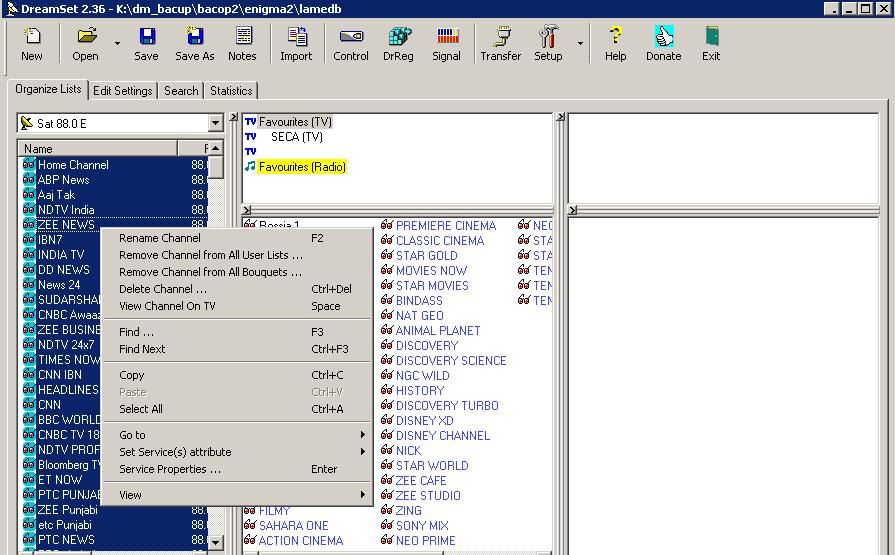
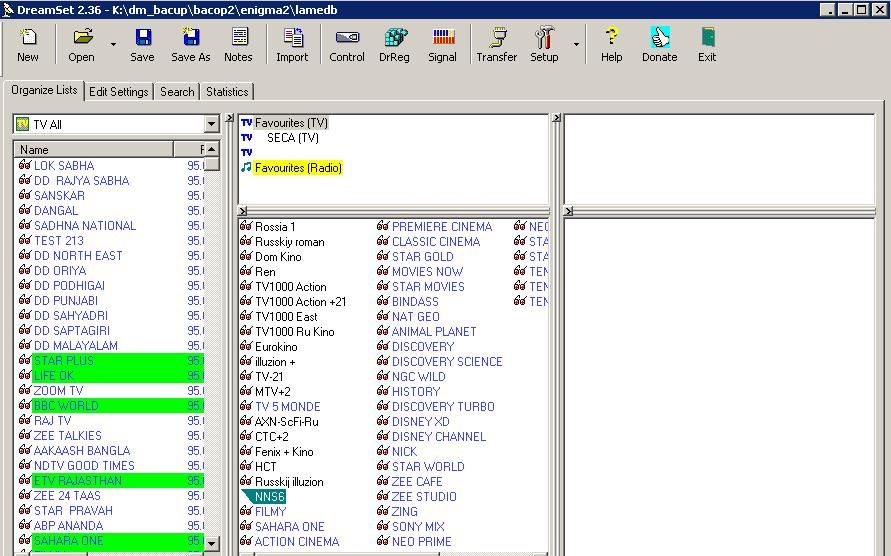
    open dreamset software
    login dm800 in setting with ip user passsword

    go to etc/enigma2 folder
    open lamedb file
    select setelite in orgnize lists
    and delate chennel/ satelite/rename etc.

    Leave a comment:


  • BM300
    replied
    Re: How to Delete channels from DM800

    Originally posted by houshang5
    Using DreamBox Edit is wasting your time, because you spend time, a lot of time to edit and delete and other and save and send to the Box then with the first scan all unwanted and deleted canal would come back.
    With DreamSet, the channels do not come back if you select hide feature.
    They only come back if you select to rescan channels using the option of reseting.
    You can always delete the transponders that have the unwanted channels from satellite.xml file.

    Leave a comment:


  • houshang5
    replied
    Re: How to Delete channels from DM800

    Originally posted by gent59
    normally, it works realy good, i often use it, when channels are inactive, to delete bouquets, change channel freq, etc it's very quickly.
    Anyway, if you have any problem with softwere don't hesitate to tell us.
    Using DreamBox Edit is wasting your time, because you spend time, a lot of time to edit and delete and other and save and send to the Box then with the first scan all unwanted and deleted canal would come back.

    Leave a comment:


  • gent59
    replied
    Re: How to Delete channels from DM800

    Originally posted by shiplu
    it doesn't work 100%, it will come back eventually.
    normally, it works realy good, i often use it, when channels are inactive, to delete bouquets, change channel freq, etc it's very quickly.
    Anyway, if you have any problem with softwere don't hesitate to tell us.

    Leave a comment:


  • Bazinga
    replied
    Re: How to Delete channels from DM800

    Originally posted by gent59
    the best way to edit/delete/insert etc.. channels is dreambox edit, use it and you will see the result.

    you can egt dreambox edit over here: __http://www.satlover.com/forum/dreambox-tools/13123-dreambox-software-tools.html
    it doesn't work 100%, it will come back eventually.

    Leave a comment:


  • gent59
    replied
    Re: How to Delete channels from DM800

    the best way to edit/delete/insert etc.. channels is dreambox edit, use it and you will see the result.

    you can egt dreambox edit over here: __http://www.satlover.com/forum/dreambox-tools/13123-dreambox-software-tools.html

    Leave a comment:


  • BM300
    replied
    Re: How to Delete channels from DM800
    Using DreamSet makes deleting the unwanted channels an easy job.
    You have many options;
    Download the channels list from your box to your computer.
    * Put all these unwanted channels in a list called unwanted.
    Sellect them all using the shift key on your computer.
    Right click on the sellectd channels and select the Hide -> Yes.
    Resend the list to your box and restart enigma2.

    * If you rescan the satellite having these unwanted channels, they will still be hiden.

    * If you want to see some of these channels (e.g. *****s content).
    You need to hide -> No them before sending them to your box again.

    * You can always have 2 versions of your channel list on 2 separate images on an external flash.

    Leave a comment:


  • vimmers
    replied
    Re: How to Delete channels from DM800

    all i can see is that you have to live with it
    but i have seen that before on my own original db800
    but i newer use the red button

    Leave a comment:


  • Bazinga
    replied
    Re: How to Delete channels from DM800

    Originally posted by vimmers
    you can try to go in in etc/enigma2
    and delete everything
    but not settings
    if you delete settings then you shall reconfigure your sats and other stuff
    tried that method, and its come back. it did take a while for it to come back.

    Leave a comment:


  • Bazinga
    replied
    Re: How to Delete channels from DM800

    Originally posted by vimmers
    you can try to go in in etc/enigma2
    and delete everything
    but not settings
    if you delete settings then you shall reconfigure your sats and other stuff
    I remember deleting everything in etc/enigma2 and it removed all settings including wifi encryption settings, is the wifi settings also in the 'settings' file?

    I'll give that a try after it comes back again.

    Leave a comment:


  • vimmers
    replied
    Re: How to Delete channels from DM800

    you can try to go in in etc/enigma2
    and delete everything
    but not settings
    if you delete settings then you shall reconfigure your sats and other stuff

    Leave a comment:


  • Bazinga
    replied
    Re: How to Delete channels from DM800

    Originally posted by vimmers
    when you have loaded the channels from dreambox
    then u shall delete the channels you dont want
    them you shall remember to save that list
    when done you upload them again to db and then you shall use reload settings on dreambox
    not Send Custom Telnet Command
    the channel does not appear on dreamedit when you transfer it from dreambox to dreamedit even after that channel comes back,

    its a channel that I manually scanned in the past and it keeps coming back randomly. its a useless inactive channel.

    I can only get rid of by clicking send custom telnet

    I know i can solve this by reflashing buts its too much hassle resetting it up.

    Another big thing I should mention,

    I have 2 dm800 connected to the same network and this unwanted channels comes back on both dm800. I always load fresh new bouquets on my dm800 and I dont know how can this happen.

    Leave a comment:


  • vimmers
    replied
    Re: How to Delete channels from DM800

    when you have loaded the channels from dreambox
    then u shall delete the channels you dont want
    them you shall remember to save that list
    when done you upload them again to db and then you shall use reload settings on dreambox
    not Send Custom Telnet Command

    Leave a comment:


  • Bazinga
    replied
    Re: How to Delete channels from DM800

    OK kind of sorted this problem,

    Using DreamEdit
    If I click 'Send Custom Telnet Command', it removes the unwanted channel from the 'All Channel List' and Removes the Provider folder where that channel was.

    BUT the unwanted channel and the provider folder keeps coming back randomly, does anyone know why its doing this?

    its not causing me a big problem but its just annoying.


    Leave a comment:

Working...